Varnexilo
Pulse Pack
Pulse Pack
Couldn't load pickup availability
- 📄 Digital file available after purchase
- 🗂️ Long-term availability
- 🔐 Secure checkout
- 🗓️ Content updated in 2026
Self-paced learning overview
Problem Statement
After learning basic HTML and CSS, learners often reach a stage where individual elements are familiar but combining them into organized page sections becomes more difficult. A page may contain correct tags and CSS rules while still having inconsistent spacing, unclear grouping, or repeated styling. Learners may also find it difficult to understand why one selector affects several elements while another affects only one. As stylesheets grow, keeping rules organized becomes increasingly important.
Solution
Pulse Pack introduces a clearer method for organizing HTML sections and connecting them with well-defined CSS rules. Learners examine how containers, semantic elements, classes, identifiers, and selector relationships influence page structure and styling. The modules provide practical exercises focused on grouping content, controlling dimensions, managing spacing, and applying reusable styles. Learners also explore how inheritance and the cascade affect competing CSS declarations.
What’s Inside
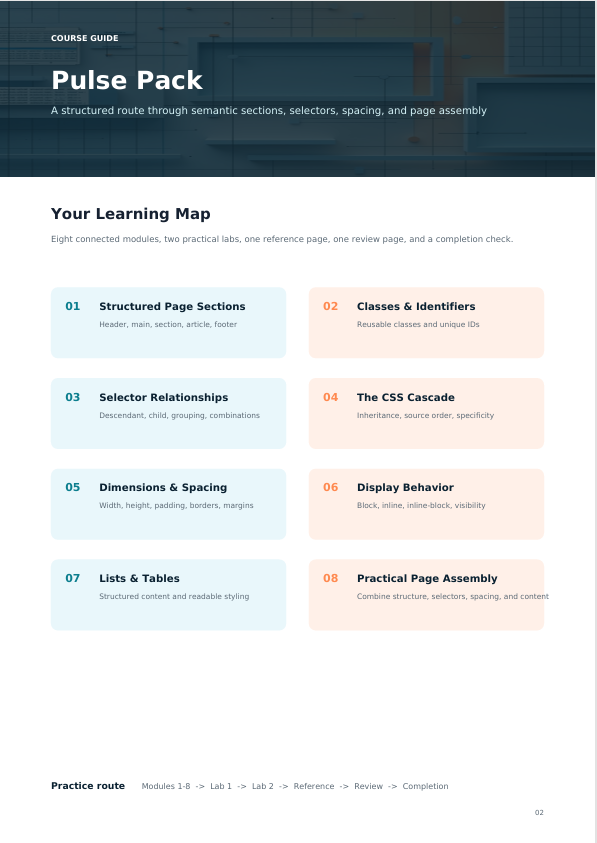
- Study headers, main content areas, sections, articles, navigation areas, and footers while learning how meaningful HTML organization improves document structure.
- Learn how classes and identifiers can target specific elements and how reusable class-based styles can reduce unnecessary repetition.
- Explore element selectors, class selectors, descendant relationships, child relationships, grouped selectors, and combinations used to target page content.
- Understand how multiple CSS rules interact, how inheritance works, and why one declaration may take priority over another.
- Practice working with width, height, margins, padding, borders, and sizing behavior across different content sections.
- Explore common display behaviors and learn how elements occupy space, begin on new lines, or sit alongside surrounding content.
- Create and style lists and tables while examining borders, spacing, alignment, rows, columns, and content grouping.
- Combine structured HTML and organized CSS into a multi-section practice page with reusable styling patterns.
Who Is This For?
Pulse Pack is intended for learners who understand introductory HTML tags and basic CSS declarations and want to develop a more organized approach to page construction. It is suitable for learners continuing from Free Kit as well as those reviewing foundational structure, selectors, spacing, and styling behavior.
What You’ll Learn
- Organize webpages into meaningful HTML sections
- Use classes and identifiers appropriately
- Apply descendant and child selectors
- Group CSS selectors efficiently
- Understand basic inheritance and cascade behavior
- Control width, height, margins, padding, and borders
- Recognize different element display behaviors
- Structure and style lists
- Create and format HTML tables
- Reduce repeated CSS declarations with reusable classes
- Organize related styling rules more clearly
- Combine multiple page sections into one structured document
- Diagnose common selector and spacing issues
- Read more detailed HTML and CSS structures
30-Day Refund Policy
The course includes a 30-day money-back period according to the applicable refund terms.
Certificate of Completion
The course includes a certificate of completion, providing learners with a clear record that they completed the Pulse Pack course materials.
Share
Does each course include practical exercises?
Does each course include practical exercises?
Yes. Practical work is included throughout the collection. Activities may involve writing HTML structures, applying CSS rules, organizing layouts, working with selectors, adjusting spacing, and combining concepts into complete page sections.
How are the courses structured?
How are the courses structured?
Each course is divided into focused modules covering specific HTML and CSS concepts. Materials combine explanations, code examples, practical exercises, and small page-building activities so learners can study concepts and apply them in context.
Do I need previous HTML or CSS knowledge before starting?
Do I need previous HTML or CSS knowledge before starting?
No. The Varnexilo collection is arranged as a progressive learning path, beginning with introductory concepts and gradually moving toward more detailed HTML and CSS topics. Learners can begin with the level that reflects their current knowledge.