Varnexilo
Luma Blueprint
Luma Blueprint
Couldn't load pickup availability
- 📄 Digital file available after purchase
- 🗂️ Long-term availability
- 🔐 Secure checkout
- 🗓️ Content updated in 2026
Self-paced learning overview
Problem Statement
As page structures become more detailed, managing repeated components across multiple sections can become increasingly complex. Small differences in spacing, typography, sizing, or alignment may create inconsistencies between related elements. Responsive behavior can also become difficult to coordinate when several components change at different screen ranges. Learners may understand individual CSS techniques but still find it challenging to combine them into one coherent structure.
Solution
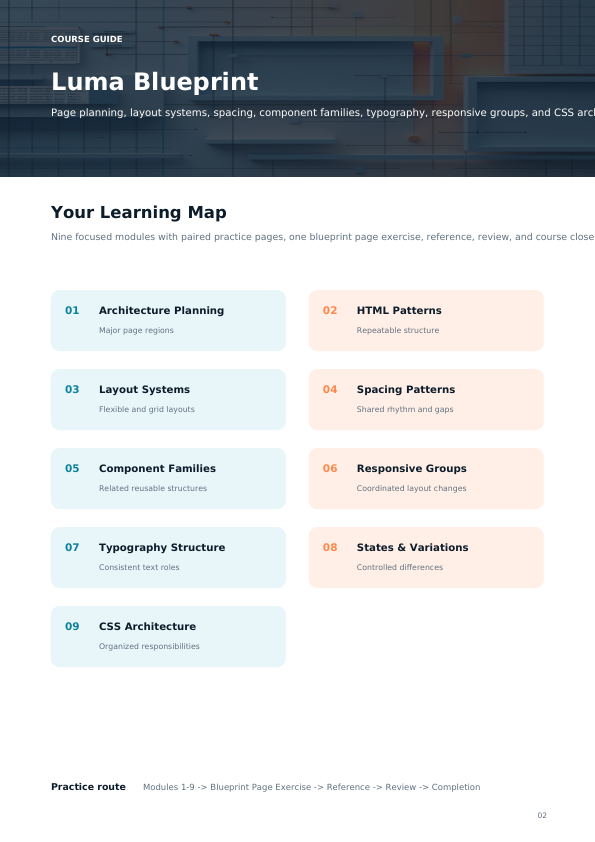
Luma Blueprint introduces a structured approach for planning HTML and CSS before writing large groups of rules. Learners examine how page regions, layout systems, reusable components, spacing patterns, and responsive states can work together. The course demonstrates how shared structural rules can reduce unnecessary CSS repetition. Practical exercises develop the ability to divide larger interfaces into smaller, manageable component groups.
What’s Inside
- Map headers, navigation areas, main sections, supporting content, side regions, and footers before building the final HTML structure.
- Create clear document hierarchies using meaningful sections, content groups, headings, and reusable structural arrangements.
- Combine flexible and grid-based layouts to organize different page regions according to their content requirements.
- Develop consistent approaches to padding, margins, gaps, widths, and section spacing across repeated components.
- Create related cards, content panels, notices, navigation groups, buttons, and information sections using shared styling foundations.
- Coordinate several components so their dimensions, alignment, and arrangement adjust together as available space changes.
- Organize headings, paragraphs, supporting text, labels, and other textual elements into consistent visual hierarchies.
- Manage selected, active, highlighted, inactive, and alternate component states through structured CSS rules.
- Separate foundational styles, layout rules, components, variations, states, and responsive conditions into understandable groups.
- Build a detailed multi-section page containing reusable components, coordinated layouts, responsive behavior, and organized CSS.
Who Is This For?
Luma Blueprint is intended for learners who are already comfortable with semantic HTML, forms, responsive layouts, CSS variables, component styling, and common selector techniques. It is suitable for learners continuing from Cipher Guide who want to organize more detailed page systems and reusable CSS structures.
What You’ll Learn
- Plan HTML architecture before styling
- Divide larger pages into logical content regions
- Build reusable structural patterns
- Combine flexible and grid-based layouts
- Maintain consistent spacing systems
- Create related component variations
- Coordinate responsive behavior across component groups
- Build clearer typography hierarchies
- Organize visual states systematically
- Separate CSS according to purpose
- Reduce unnecessary repeated declarations
- Diagnose layout inconsistencies across larger pages
- Build a coordinated multi-section interface
30-Day Refund Policy
The course includes a 30-day money-back period according to the applicable refund terms.
Certificate of Completion
The course includes a certificate of completion, providing learners with a clear record that they completed the Luma Blueprint course materials.
Share
Does each course include practical exercises?
Does each course include practical exercises?
Yes. Practical work is included throughout the collection. Activities may involve writing HTML structures, applying CSS rules, organizing layouts, working with selectors, adjusting spacing, and combining concepts into complete page sections.
How are the courses structured?
How are the courses structured?
Each course is divided into focused modules covering specific HTML and CSS concepts. Materials combine explanations, code examples, practical exercises, and small page-building activities so learners can study concepts and apply them in context.
Do I need previous HTML or CSS knowledge before starting?
Do I need previous HTML or CSS knowledge before starting?
No. The Varnexilo collection is arranged as a progressive learning path, beginning with introductory concepts and gradually moving toward more detailed HTML and CSS topics. Learners can begin with the level that reflects their current knowledge.